An update to Solver’s data services is being deployed, one region at a time, in Q4 2026. This update introduces a major change to the architecture of how Solver handles the execution of integrations/rules/jobs; commonly referred to as a data load. From the user interface perspective, very few changes will be noticeable, but this is a significant re-write of how Solver handles data load processes.
A couple features to highlight:
- A complete re-write of how Solver executes the backend steps when running an integration, commonly referred to as Extract, Transform and Load (ETL).
- A rolling update of connectors to support a “streaming” extraction. This will reduce the size of data that is being uploaded to Solver; improving stability.
Data Services Deployment
The data services update rollout is anticipated to take 6-8 hours per environment. During this time:
- Jobs and Event Log will be unavailable.
- Scheduled Jobs that should start between the start time and end time of the update will not execute.
- Site performance may be interrupted and/or significantly slower.
The latest state of the upgrade can always be viewed on Solver’s status page (status.app.solverglobal.com).
Rollout Dates
The below table details the rollout dates per region.
| Environment | Deployment Date (Start Time) | Status | Notes |
|---|---|---|---|
| Demo | Fri, Sept 18 @ 6PM PT | Done | |
| AE | Thurs, Oct 1 @ 10AM PT – 9PM UAE | Done | |
| CA | Fri, Oct 2 @ 6PM PT | Done | |
| EU | Fri, Oct 9 @ 10AM PT – 7PM CET | In Progress | |
| AU | Fri, Oct 23 @ 10AM PT – Sat, Oct 24 @ 3AM AEST | Planned | |
| US | Fri, Nov 13 @ 6PM PT | Planned |
Customer Actions
This sections details steps to be taken prior to the above-mentioned rollout dates. For this section, there is only one mandatory step that must be taken by customers using the Solver Gateway.
- If you are not using the Solver Gateway, you can skip this section
Gateway Installs
For customers using the Solver Gateway to load data from your source system into Solver, there is a mandatory upgrade of this Windows application prior to you region’s data services deployment.
Solver has sent out a couple notifications on this
- July 17
- Sept 3, 2026
- In-app communication sent to the customer admins for those customers that have a Gateway v2.4 and older only.
Identify which version you have installed.
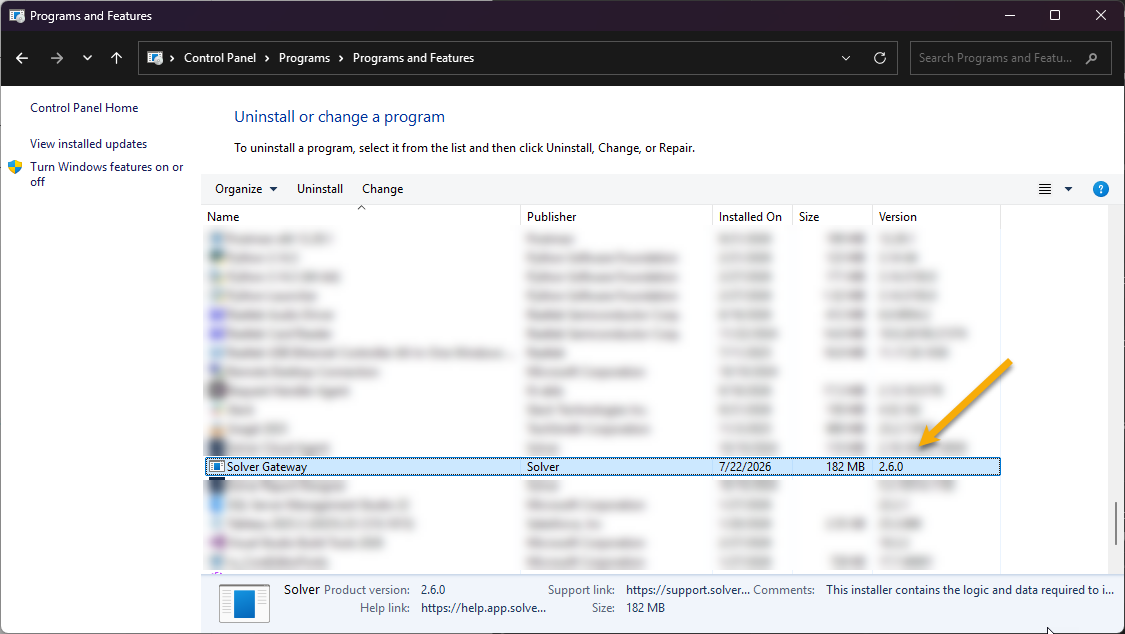
To identify the installed Gateway version, on the server the Solver Gateway is installed on
- Navigate to Control Panel > Add / Remove Programs
- Search for Solver Gateway and it will list the installed version.
Upgrading the Gateway Install
If your installed Gateway Version is 2.4 and older, follow these instructions to upgrade your Gateway install.
Post Deployment Differences
Post data services deployment to your region, users will notice the following changes.
- Before clicking create, edit or delete (CRUD) on a job, users will be informed about a monitoring period.
- New Connectors
- Difference in Last Run times
Monitoring Period
Post deployment, Solver will be in a monitoring period where Solver is ensuring system stability and scheduled data loads are working properly. The duration of this monitoring period is expected to be 2-5 days, the length will be communicated in the warning message that will appear.
The below is an example of the message users will see when they perform a CRUD action on the Jobs menu
- This monitoring period only impacts Jobs.
- Changes to Integrations & Rules are not impacted by the monitoring period.
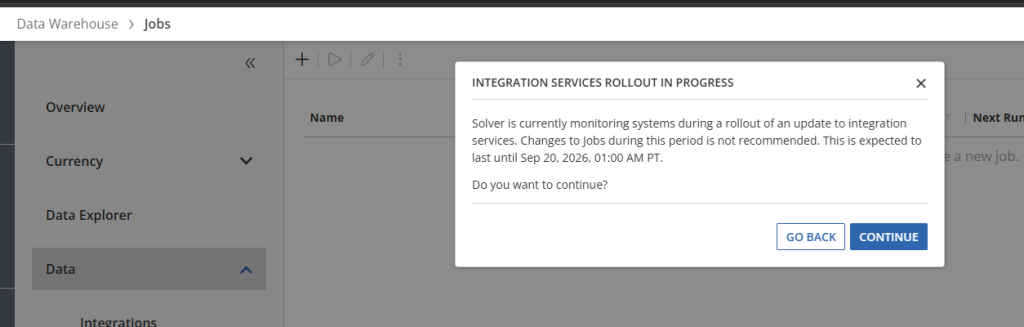
During this time, it is not recommended to make changes to your jobs as theses changes
- Are not recoverable should Solver need to rollback the deployment
- Will create differences in our analytics, introducing variables to the data we are analyzing.
Solver understands that edits may be needed to Jobs but recommends holding off during this monitoring period unless they are critical.
Users can click Continue to proceed with their edits to a Job or they can click Go back to cancel.
New Connectors
As part of this update, Solver will be installing new Connectors for
- Gateway
- Business Central OData
There is no additional action required by the customer.
Last Run Times
As part of this deployment, the last 30 days of Event Log data has been migrated to a new logging system. This change will result in the Last run date in certain scenarios to be empty/blank. This migration does not:
- Impact the transactional data that has been imported into your tenant.
- Impact your ability to run the integration/rule/job
The impacted scenarios where the Last run timestamp may no longer be shown are
- Any integration/rule/job that has not been executed in the last 30 days.
- Pre-deployment: Last Run column will have a date that is more than 30 days from the day of data services deployment.
- Post Deployment: Last run column will be empty.
- Integrations/rules/jobs that have only been ran manually (not part of a job) will also appear empty.
Solver does retain your previous execution times and can be requested via support.
Upon your first execution post the data services update, the Last run date will update accordingly.
Release Notes
Oct 14, 2026
Bug Fixes and Enhancements
- Address gradual memory leak
- Calculation expressions that have null values, should be treated as zero.
- Calculation expressions that calculate to an integer, should not error out.
Oct 9, 2026
Bug Fixes and Enhancements
- Increment() function was not working correctly.
- Retry on connection timeouts.
- Business Central:
- A blank response from the Business Central API should be treated as a successful response and the integration should continue.
- Solver Gateway
- Empty responses from the customer’s source data system should be treated as a successful response and the integration should continue.