The Audit Log enables users to view information of actions taking place in Solver. With the July 2026 update, the Audit Log will show information about database backup requests. Future updates to this feature will provide more information on other actions performed in Solver. Check future release notes and this article for updates on expanded functionality of the Audit Log.
- The Audit Log tracks actions of the tenant you are currently logged into. The Audit Log does not track actions across multiple tenants in one screen.
- Audit Log is a Solver Cloud only feature.
Enabling Access to the Audit Log
Users must be assigned the permission, Can view audit logs, in order to access auditing information. To grant access.
- As an Administrator, navigate to Settings > Administration > Users or Roles
- Customer Admins do not have access to the Audit Log by default.
- Select the User or Role that should have this permissions
- In the System section of permissions, enable “Can view audit logs”
- Upon your next login, the user or role should see the Audit Log menu option via the Settings Menu.
Audit Log Features
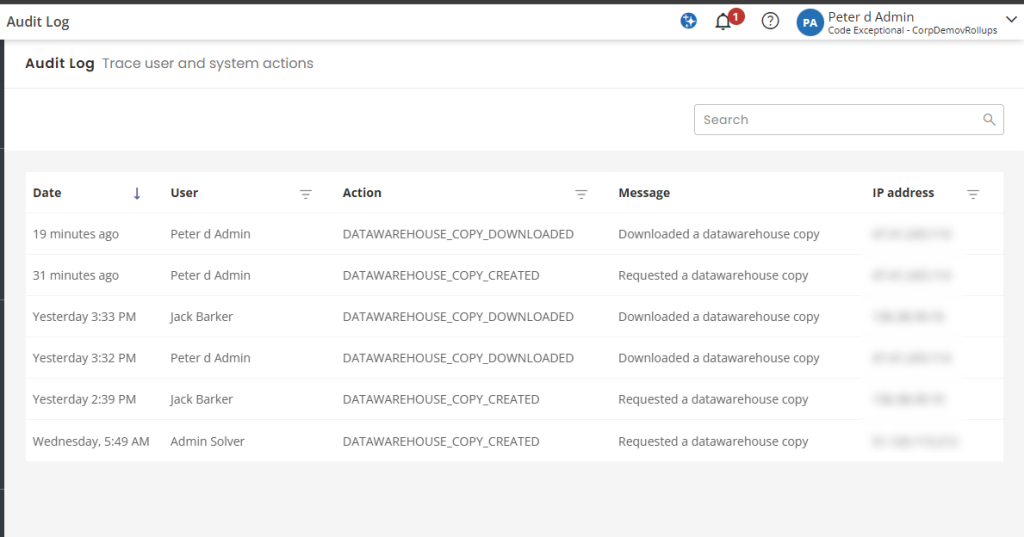
The Audit Log presents information about actions taking place in your tenant within Solver. Navigating to Settings > Audit Log, the user will see a list of actions that include
| Feature | Detail | Added to Audit Log |
| Database backup created | Records when a user requested a backup | July 2026 |
| Database backup downlaoded | Records when a user downloaded a backup | July 2026 |
Additionally, the following information is provided
- Date: The time, in the logged in users local timezone, when the action took place
- User: The user who recorded the action
- Action: The type of action performed.
- Message: additional details about the action performed
- IP Address: the IP address of the user at the time the action was performed.
Users can use the search option or filters to narrow the amount of data being shown or to find the actions of a specific user.
- Exporting this list is currently not supported.
- Reporting off this list is currently not supported.