The Audit Log enables customer admins to view information of actions taking place in Solver. Starting July 2026, the Audit Log will show information about actions taking place across your tenants. Future updates to this feature will provide more information on other actions performed in Solver.
Check future release notes and this article for updates on expanded functionality of the Audit Log.
- The Audit Log tracks actions across all tenants that belong to your organization (ie: Production and Sandbox).
- Audit log is available to customer admins only.
- Audit Log shows the last 60 days of activity. Solver does retain the last 365 days of history by request only via support@solverglobal.com
- Audit Log is a Solver Cloud only feature.
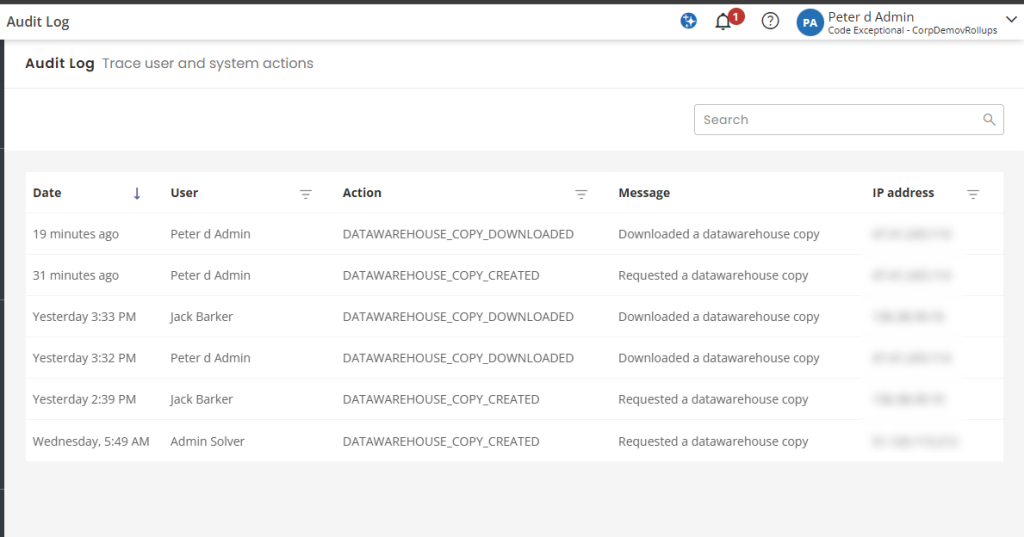
Audit Log Features
The Audit Log presents information about actions taking place in your tenant within Solver. Navigating to Settings > Audit Log, the user will see a list of actions that include
| Feature | Detail | Date Added |
| Database backup created | Records when a user requested a backup | July 2026 |
| Database backup downlaoded | Records when a user downloaded a backup | July 2026 |
| Add/remove permission | Change permission for a user/role | Aug 2026 |
| Add/remove license | change license type for a user | Aug 2026 |
| Apply an implementer license | apply the implementer license | Aug 2026 |
| Add/remove user | Add/Remove user from a tenant | Aug 2026 |
| Invite/Re-invite user | Invite/ Reinvite a user to a tenant | Aug 2026 |
| Click Display invitiation link | Read the invitation link | Aug 2026 |
| Create/Edit/Delete Role | Changes to a role | Aug 2026 |
| Add/Remove User from Role | Add/Remove user from a role | Aug 2026 |
| Add/Edit/Delete from Data Access | change data access permission(s) for a user/role | Aug 2026 |
| Change tenant info | change information about the tenant | Aug 2026 |
| Read Audit Log | Read the data in the Audit Log | Aug 2026 |
| Enable/Disable AI | Enable/Disable Solver Copilot Features | Aug 2026 |
| Enable/Disable MFA | Enabled/Disable MFA | Aug 2026 |
| Add EntraID Domain | Add an EntraID domain to Solver | Aug 2026 |
| Enable/Disable Okta | Enable/Disable Okta | Aug 2026 |
| Update Okta settings | Update Okta Auth Settings | Aug 2026 |
| Add/remove customer admin | Add/remove customer admin | Aug 2026 |
| Download User Report | Download User Remove | Aug 2026 |
| Reset MFA | Reset MFA for a user | Aug 2026 |
| Cancel Reset MFA request | Cancel users reset MFA request | Aug 2026 |
| Reset External Authentication | Reset External Authentication | Aug 2026 |
| Add/Remove Tenant | Create or Delete a tenant | Aug 2026 |
| Change User Account Info | Changes to name, email, phone, comment | Aug 2026 |
| Context Change | A user switches to a different tenant | Aug 2026 |
Additionally, the following information is provided
- Date: The time, in the logged in users local timezone, when the action took place
- User: The user who recorded the action
- Action: The type of action performed.
- Message: additional details about the action performed
- IP Address: the IP address of the user at the time the action was performed.
Users can use the search option or filters to narrow the amount of data being shown or to find the actions of a specific user.
- Reporting off this list is currently not supported.
Exporting
Users can export the Audit Log to a .csv file. This feature exports the current view, including the filters the user has applied. For performance purposes, it is recommended to filter the data to specifically what you need to export.